Drag the slider to adjust text size.
The Green Monster Kodi Build has become one of the most popular Kodi builds in 2026, offering users a comprehensive media center experience with a clean interface and extensive content library. This February 2026 guide will walk you through the installation process step-by-step, ensuring you can enjoy this powerful build without any technical headaches.
🔒 Protect Your Kodi Streaming
Avoid ISP tracking and stream Kodi safely using one of the fastest and most trusted VPN services.
✔ Works with Kodi & Firestick
✔ No Logs Privacy Protection
✔ 30-Day Money Back Guarantee
Recommended for safe and private Kodi streaming
Whether you’re new to Kodi or an experienced user looking to upgrade your setup, this guide covers everything you need to know about installing and optimizing the Green Monster Kodi Build on your device.
What is the Green Monster Kodi Build?
The Green Monster Kodi Build is a pre-configured Kodi setup that comes with numerous add-ons, skins, and settings already optimized for the best streaming experience. Unlike installing Kodi from scratch, this build provides immediate access to movies, TV shows, live sports, and more through a user-friendly interface.
This build stands out because of its stability, regular updates, and extensive content library. The February 2026 version includes the latest add-ons and security patches, making it one of the most reliable options available this year.
Why Choose the Green Monster Kodi Build?
Before diving into the installation process, let’s understand why this build has gained such popularity:
- Comprehensive Content: Access to thousands of movies, TV series, live channels, and sports events
- User-Friendly Interface: Intuitive navigation that works well on both TV and mobile devices
- Regular Updates: The development team consistently updates the build with new features and security improvements
- Performance Optimized: Built to run smoothly on various devices, from Amazon Fire Stick to Android TV boxes
- Customizable: Despite being pre-configured, users can still modify settings to suit their preferences
Preparing Your Device for Installation
Before installing the Green Monster Kodi Build, you’ll need to prepare your device properly. This preparation ensures a smooth installation process and optimal performance.
Enable Unknown Sources
Kodi doesn’t allow installations from third-party sources by default. You’ll need to enable this option:
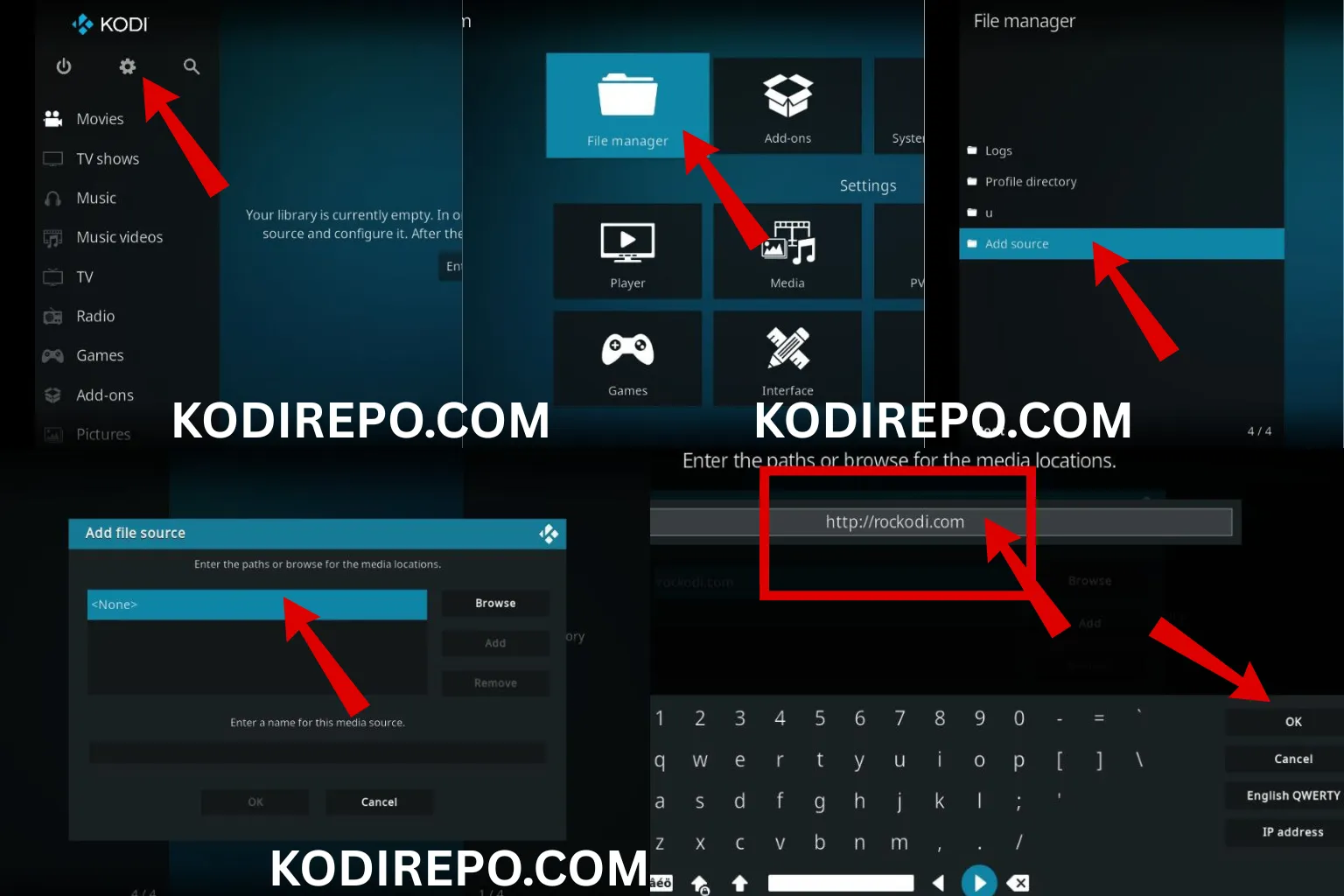
- Open Kodi and click the gear icon (Settings)
- Select “System” or “System Settings”
- Navigate to “Add-ons”
- Toggle “Unknown Sources” to ON
- Confirm the warning message
Install a File Manager
You’ll need a file manager add-on to install the build. The URL Resolver or Zips file manager works best:
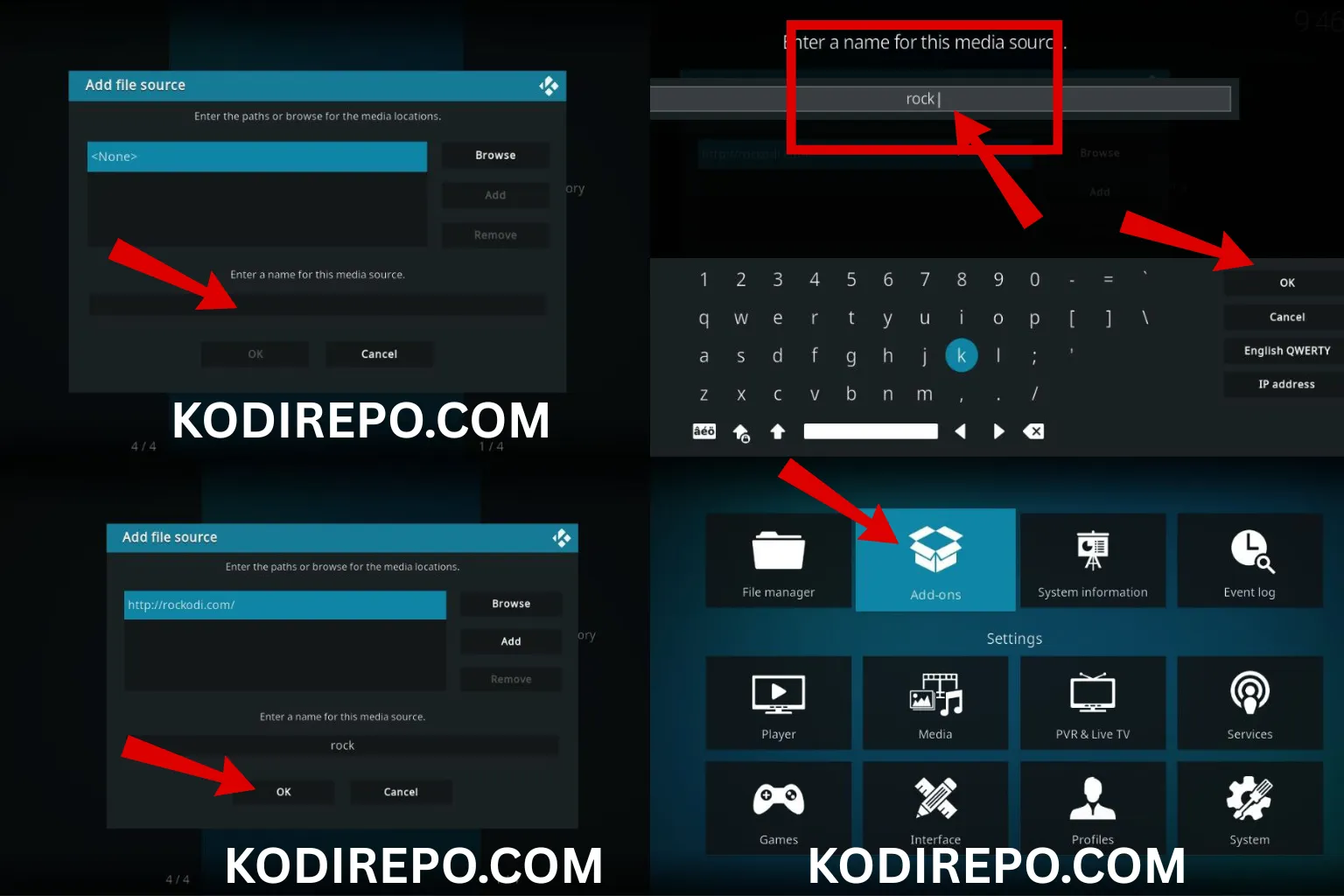
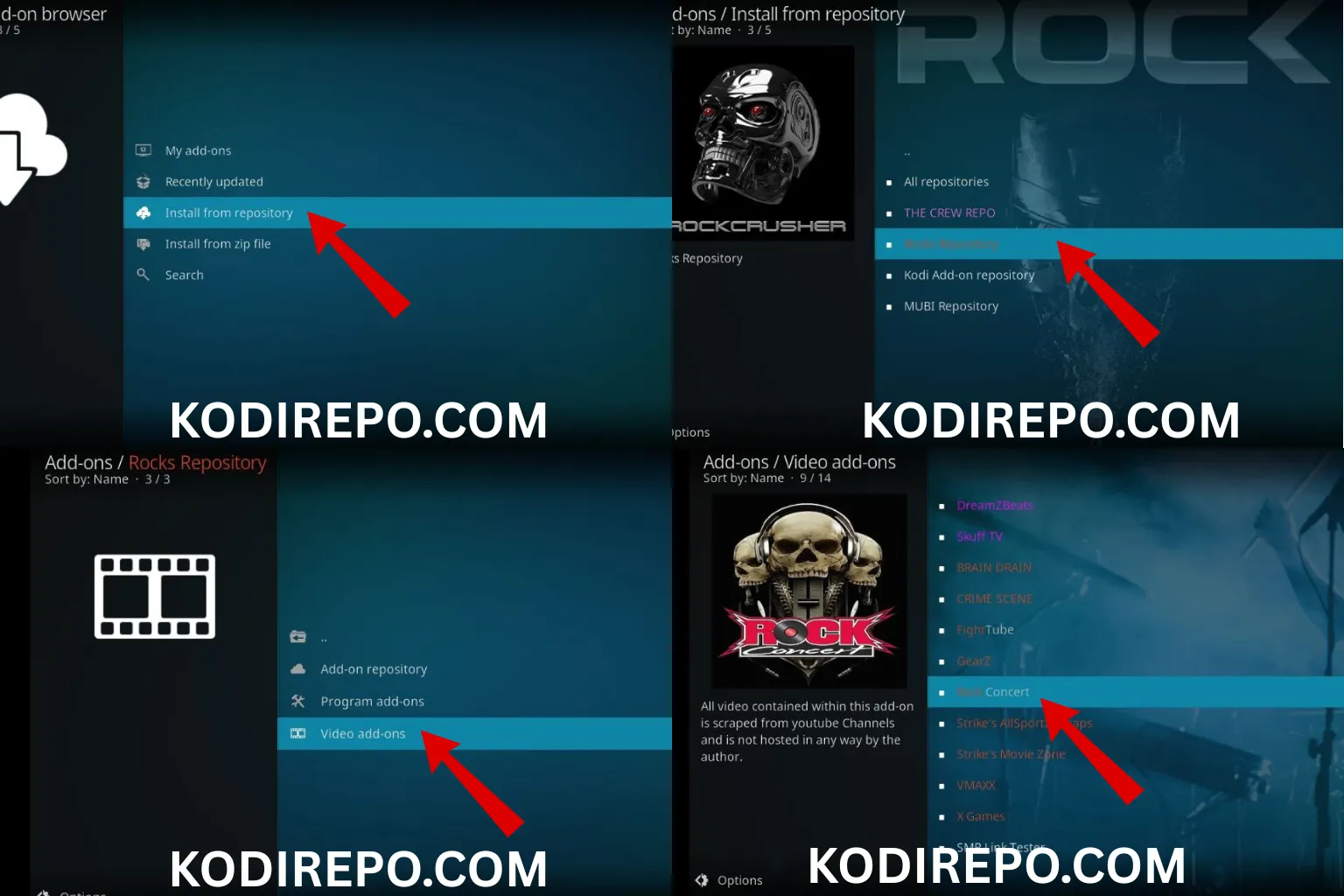
- Go to “Add-ons” from the main menu
- Click the box icon (Package Installer)
- Select “Install from repository”
- Choose “Kodi Add-on Repository”
- Find and install “Zip Installer” or similar file manager ( https://team-crew.github.io )
Step-by-Step Installation Guide
Now that your device is prepared, let’s walk through the installation process for the Green Monster Kodi Build.
Step 1: Download the Build File
First, you need to obtain the build file. Visit the official Green Monster website or a trusted repository to download the latest version. The February 2026 build is typically around 200-300MB, so ensure you have a stable internet connection.
Step 2: Install the Build
Follow these detailed steps to install the build:
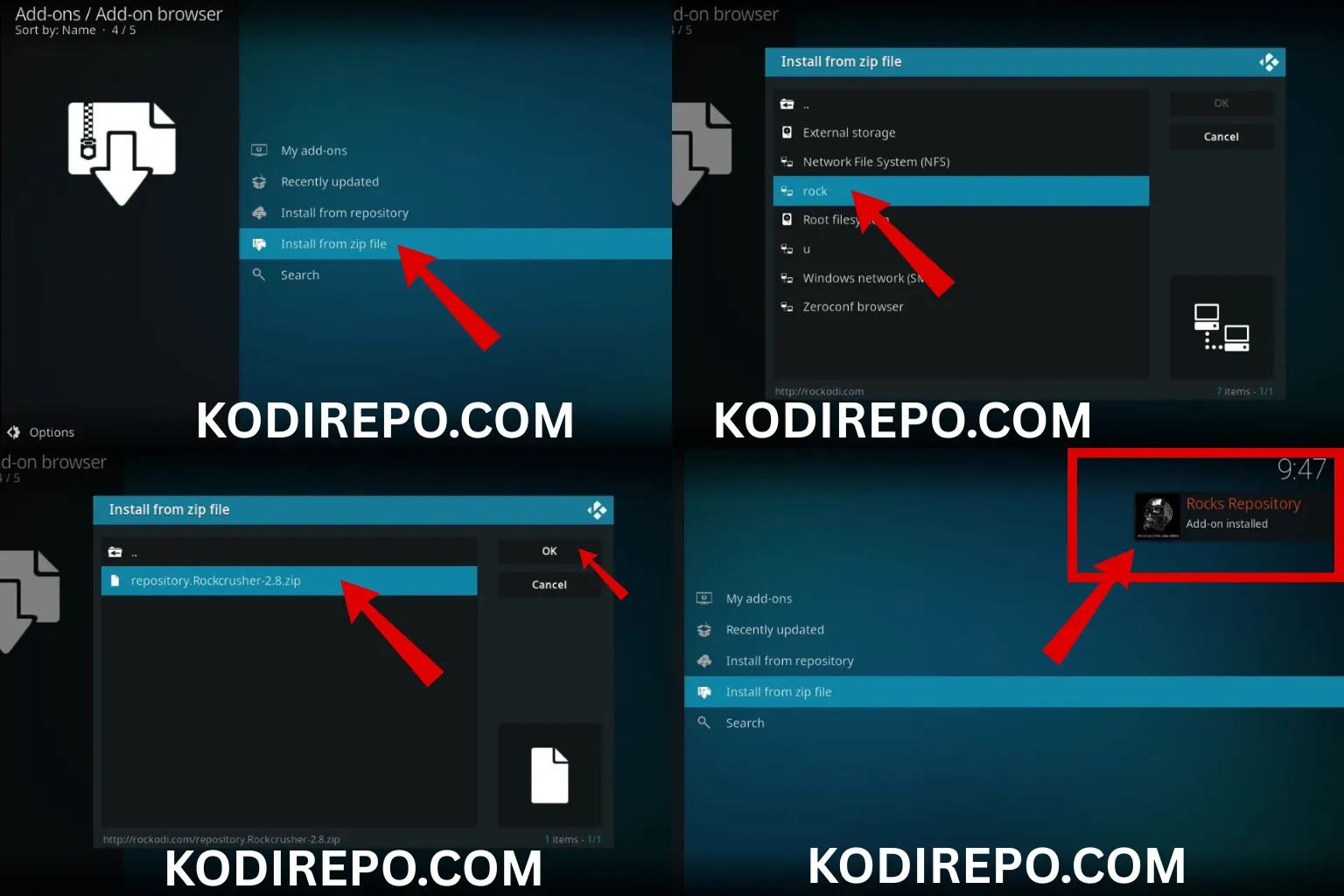
- Open Kodi and navigate to the “Add-ons” section
- Click the package icon (top-left corner)
- Select “Install from zip file”
- Navigate to where you saved the downloaded file
- Select the Green Monster Build zip file
- Wait for the installation notification to appear
Step 3: Configure Initial Settings
After installation, you’ll need to configure some basic settings:
- When prompted, select “Fresh Install” (recommended for best performance)
- Allow the build to download and install all necessary components
- Wait for the process to complete (this may take 5-10 minutes)
- Once finished, the build will automatically launch
Step 4: Essential Post-Installation Setup
To optimize your experience with the Green Monster Kodi Build, complete these setup steps:
- Update Add-ons: Go to “Add-ons” > “My add-ons” and update any available add-ons
- Configure Settings: Adjust video and audio settings based on your device capabilities
- Set Up Favorites: Organize your most-used add-ons for quick access
Troubleshooting Common Installation Issues
Even with a straightforward process, you might encounter some issues. Here are solutions to common problems:
Build Won’t Install
If the build fails to install, try these solutions:
- Clear Kodi cache: Settings > System > Maintenance > Clear Cache
- Check your internet connection
- Ensure you have enough storage space on your device
- Try downloading the build file again
Build Crashes or Freezes
Performance issues can often be resolved by:
- Reducing the number of running add-ons
- Clearing cache regularly
- Ensuring your device meets minimum system requirements
- Updating to the latest version of Kodi
Add-ons Not Working
If specific add-ons aren’t functioning properly:
- Check if the add-on requires authentication
- Verify your internet connection
- Update the problematic add-on individually
- Reinstall the build if issues persist
Optimizing Your Green Monster Experience
Once installed, you can enhance your experience with these optimization tips:
Performance Optimization
- Adjust cache settings: Navigate to Settings > Player > Files and increase cache size
- Limit background processes: Disable unnecessary add-ons running in the background
- Use a VPN: For privacy and accessing geo-restricted content
Customization Options
The Green Monster Kodi Build offers various customization options:
- Change the skin to match your preferences
- Organize add-ons into categories
- Set up parental controls if needed
- Configure automatic updates for add-ons
Safety and Legal Considerations
When using Kodi builds like the Green Monster Kodi Build, it’s important to consider safety and legality:
- Use a VPN: Protect your privacy and access content safely
- Verify sources: Only download builds from trusted repositories
- Understand local laws: Streaming content may be subject to regional regulations
- Keep software updated: Regular updates include important security patches
Alternative Builds to Consider
While the Green Monster Kodi Build is excellent, you might also want to explore these alternatives:
- Titanium Build: Known for its stability and comprehensive content
- No Limits Magic Build: Popular for its extensive add-on collection
- Diggz Xenon Build: Offers a modern interface with excellent performance
Conclusion
The Green Monster Kodi Build offers an exceptional streaming experience with its comprehensive content library and user-friendly interface. The February 2026 version brings the latest features and security improvements, making it a top choice for Kodi users.
By following this guide, you should now have a fully functional Green Monster Kodi Build installed on your device. Remember to keep the build updated, use safety precautions like VPNs, and explore the various customization options to tailor the experience to your preferences.
Whether you’re streaming movies, TV shows, or live sports, this build provides a reliable platform for all your entertainment needs. Enjoy your enhanced Kodi experience with the Green Monster Kodi Build!
This comprehensive guide should help both beginners and intermediate users successfully install and optimize the Green Monster Kodi Build for the best possible streaming experience in February 2026.






