Drag the slider to adjust text size.
If you’re looking to stream RTL+ content directly on Kodi, the RTL+ Kodi Addon is a must-have. This addon brings live TV, on-demand shows, and exclusive content from RTL, VOX, n-tv, and more right into your Kodi media center.
🔒 Protect Your Kodi Streaming
Avoid ISP tracking and stream Kodi safely using one of the fastest and most trusted VPN services.
✔ Works with Kodi & Firestick
✔ No Logs Privacy Protection
✔ 30-Day Money Back Guarantee
Recommended for safe and private Kodi streaming
In this guide, I’ll walk you through the complete RTL+ Kodi Addon installation process, explain what it offers, and help you get started quickly—even if you’re new to Kodi.
What is the RTL+ Kodi Addon?
The RTL+ Kodi Addon (also called RTL Plus) is a third-party addon that allows Kodi users to access content from RTL+—one of Germany’s largest streaming platforms. With this addon, you can stream:
- Live TV channels like RTL, VOX, Nitro, and SUPER RTL
- Catch-up TV and on-demand shows
- News, sports, and entertainment content
- Exclusive RTL+ originals
This addon is especially useful for German-speaking users or anyone interested in German media.
Is the RTL+ Kodi Addon Safe and Legal?
Before installing any third-party Kodi addon, it’s important to consider safety and legality.
- Safety: Since RTL+ is an official streaming service, the addon is generally safe if downloaded from a trusted source.
- Legality: Streaming copyrighted content without proper authorization can be illegal in some regions. Always use a VPN when streaming with Kodi to protect your privacy.
I recommend using a reputable VPN like ExpressVPN or NordVPN to keep your streaming anonymous and secure.
Prerequisites for Installing RTL+ Kodi Addon
Before you begin, make sure you have:
- Kodi installed on your device (Windows, Mac, Android, Firestick, etc.)
- A stable internet connection
- An RTL+ account (optional but recommended for full access)
- The ability to install third-party addons enabled in Kodi
To enable third-party addons:
1. Open Kodi → Settings (gear icon)
2. Go to System → Add-ons
3. Toggle on “Unknown sources”
4. Confirm the warning
How to Install RTL+ Kodi Addon (RTL Plus)
Follow these steps carefully to install the RTL+ Kodi Addon:
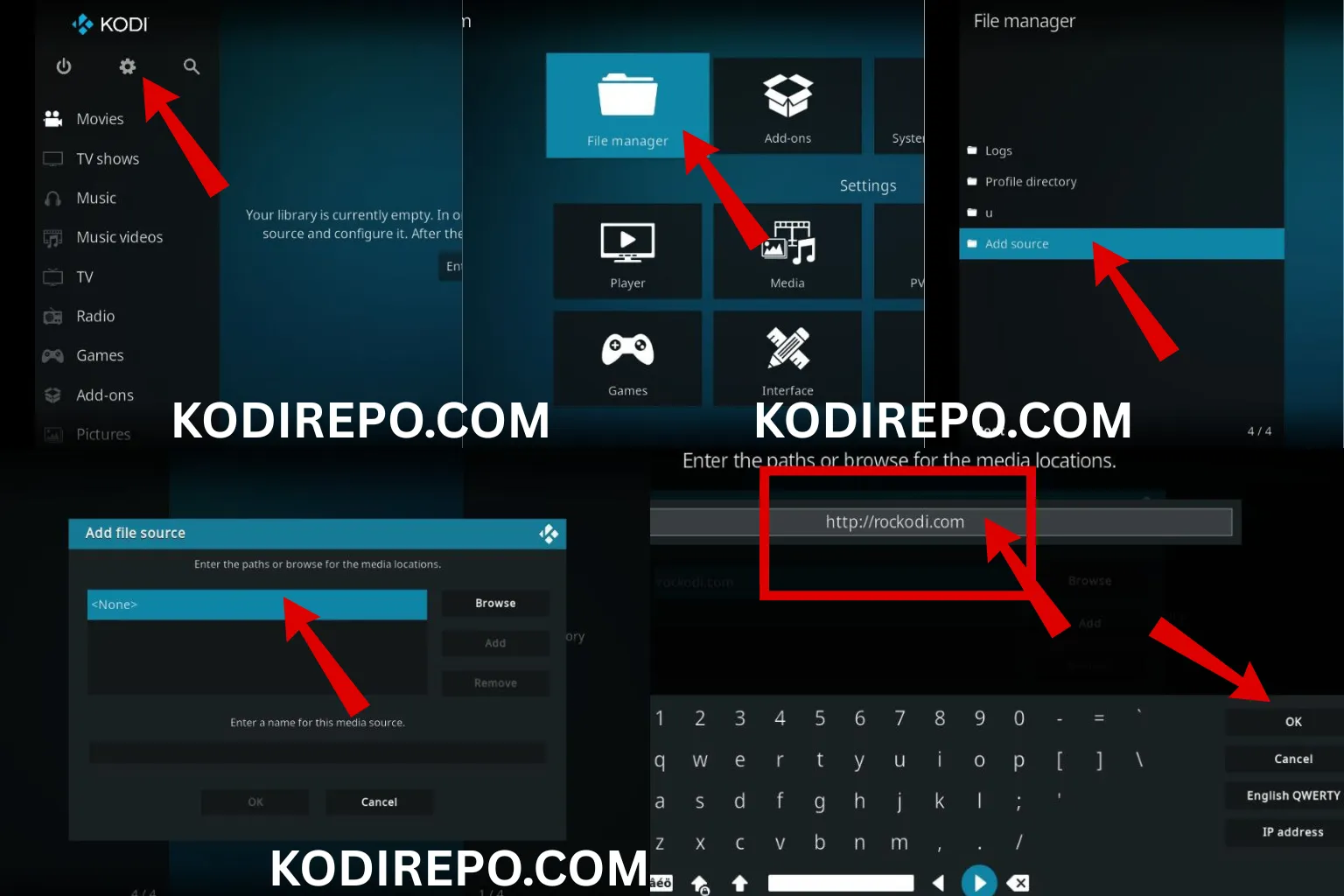
Step 1: Add the Source Repository
⚠️ WARNING: Before installing this Kodi addon, it is strongly recommended to use a VPN to protect your privacy while streaming.
👉 Get 76% NordVPN Deal- Open Kodi and click on the Settings icon
- Select File Manager
- Click on “Add source” (folder icon)
- Choose “
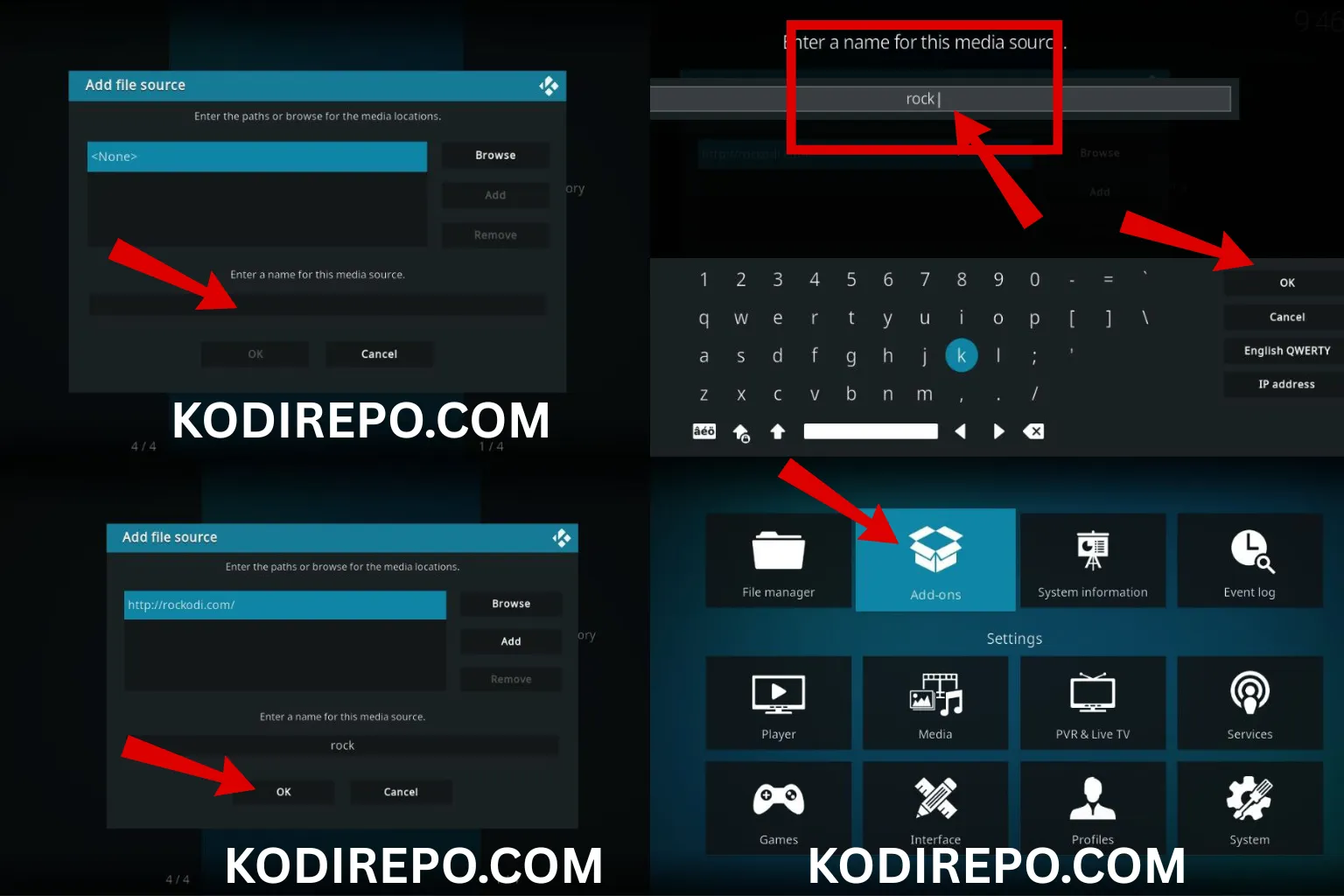
“ and enter the repository URL:https://tinyurl.com/Kodishark - Name the source “RTL Addons” and click OK
Step 2: Install the Repository
- Go back to the Kodi home screen
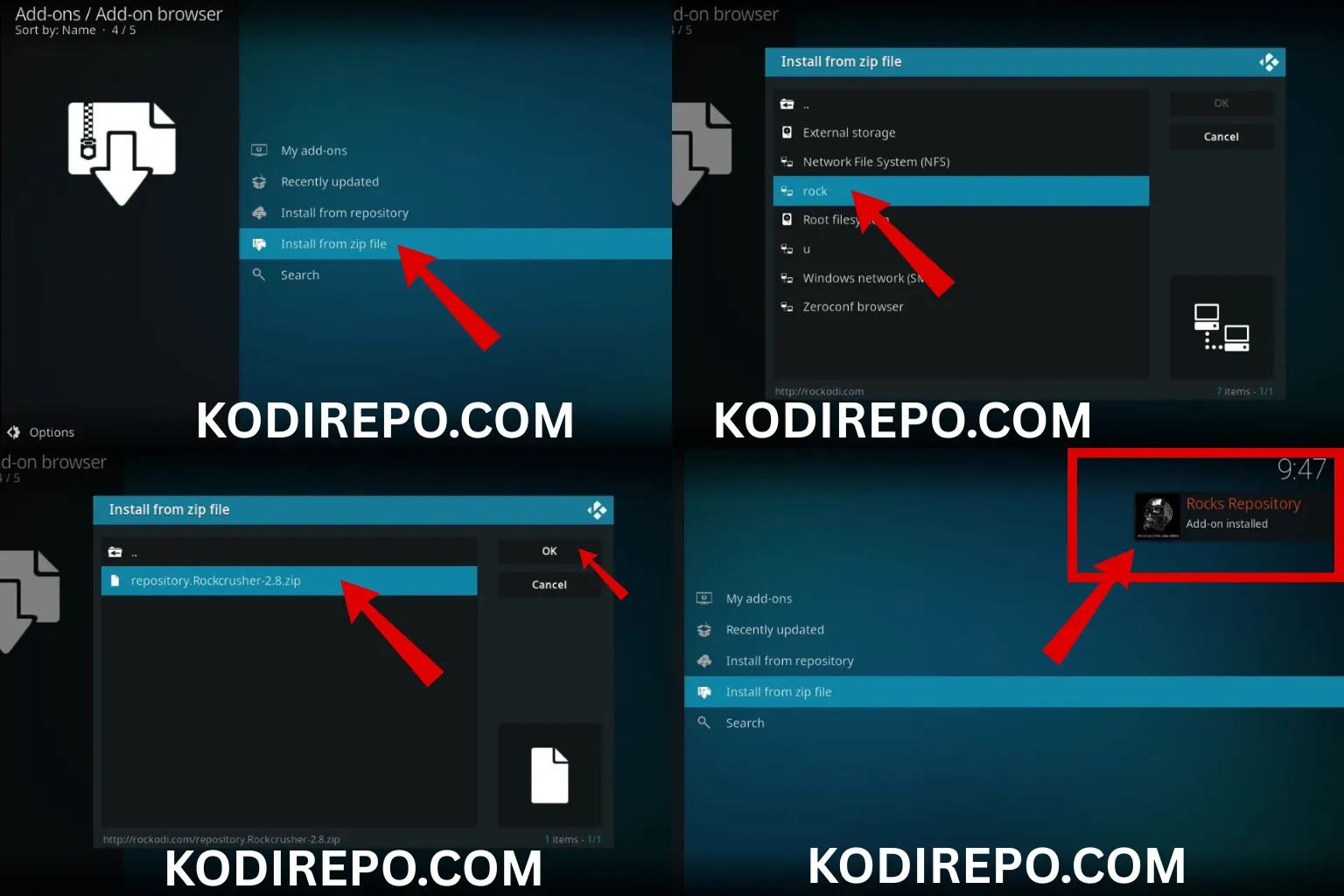
- Click on Add-ons → Package Installer (top-left icon)
- Select “Install from zip file”
- Choose “RTL Addons” and select the latest repository file (e.g.,
repository.rtl-x.x.zip) - Wait for the notification that the repository was installed
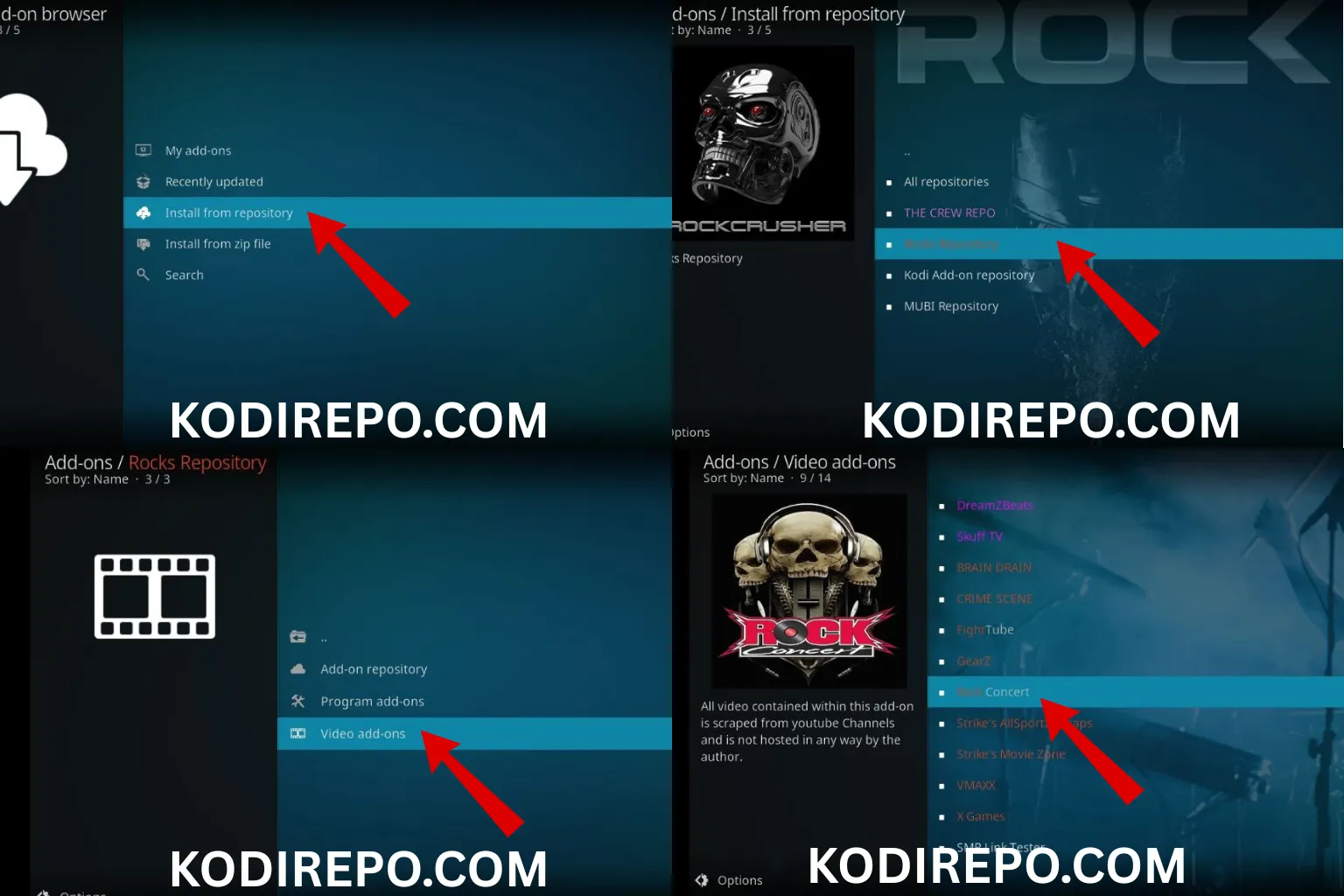
Step 3: Install the RTL+ Addon
- From the same Package Installer menu, select “Install from repository”
- Choose “RTL Addons Repository”
- Go to Video add-ons
- Find and click on “RTL+”
- Click Install and wait for the addon to download and install
Once installed, you’ll see a notification confirming the RTL+ Kodi Addon is ready to use.
RTL+ Kodi Addon Features
Here’s what you can expect once the RTL+ Kodi Addon is installed:
- Live TV Streaming: Watch RTL, VOX, NITRO, SUPER RTL, and more in real-time.
- Catch-Up TV: Access recently aired shows and programs.
- On-Demand Library: Browse a wide range of movies, series, and documentaries.
- User-Friendly Interface: Clean and easy-to-navigate menus.
- Regular Updates: The addon is maintained and updated for compatibility.
Troubleshooting Common Issues
If you run into problems, try these fixes:
- Addon not working: Clear the addon cache via Kodi settings.
- Stream not loading: Check your internet connection or try a different stream source.
- Repository not installing: Double-check the source URL and try again.
If issues persist, visit the official RTL Addons GitHub page for support or updates.
RTL+ Kodi Addon Alternatives
If the RTL+ Kodi Addon doesn’t meet your needs, consider these alternatives:
- ZDF Mediathek: Official ZDF content for German TV.
- ARD Mediathek: Another great source for German public broadcasting.
- YouTube: Many RTL shows are available officially on YouTube.
Conclusion
The RTL+ Kodi Addon is a powerful tool for streaming German TV and on-demand content directly through Kodi. With its easy installation process and rich feature set, it’s a great addition to any Kodi library—especially for German-speaking users.
Just remember to use a VPN for privacy, install from trusted sources, and keep your addon updated for the best experience.
Now that you know how to install the RTL+ Kodi Addon, go ahead and enjoy seamless streaming of your favorite RTL+ content on Kodi!